
The annual calendar I needed but could not find…
At the start of each year, my husband and I sit down to plan our year. With a cup of coffee in hand, we roll out a huge A1 wall calendar, marking off important dates, events, and big plans. We set aside time to plan:
-
School holidays
-
Family trips
-
Races and events
-
Home renovations and maintenance
We started this ritual after one year where, come December, we realized we had barely taken a proper break. We were both exhausted, running on autopilot, and feeling unfulfilled. It was a harsh realization that, despite all the hustle, we had not made time for the things that truly mattered.
That’s when we decided to change things. We made it a point to plan in January, with intention and focus, so we could see the whole year and make space for what mattered most. This has become one of our most treasured rituals.
But while our wall calendar was great, I wanted something more — a digital version of an annual calendar that I could access anytime, anywhere, and that would help me see the big picture clearly without getting lost in the daily grind.
This idea was also inspired by two things: the 12 Week Year book and Jesse Itzler’s Big Ass Calendar. Both encouraged me to think differently about yearly planning and how to break big goals into manageable chunks. I wanted a tool that aligned with these principles — a way to not just plan but to truly track progress and stay on top of my bigger goals.


The Goal
I wanted a simple, clear way to see the entire year at a glance — not just to mark off events, but to truly plan for them in a way that aligned with our bigger goals.
This was more than just building a calendar. It was about creating something that could:
-
Highlight the most important things for the year
-
Help me spot gaps, overlaps, and opportunities for growth
-
Align my yearly planning with quarterly goals (inspired by The 12 Week Year book)
-
Keep it simple and uncluttered
There were plenty of digital calendars out there, but none of them gave me the clean, spacious annual view I needed. Most either didn’t show the full year, or when they did, it felt crowded and hard to read. So, I decided to build something that would work the way my brain works — something that would give me both clarity and control.

The Planning
This project marked a huge milestone for me: it was my first live app launch, and I’m honestly really proud of it. It was my main Quarterly Quest for Q1, and I hit the mark. That’s a big deal for me.
When I build anything, I always start with the database. I need to understand how everything connects before anything else can fall into place. From there, I kept the scope small and clear to avoid the temptation to “over-complete” the project.
For version 1 of the app, I focused on the essentials:
-
A simple annual view with color-coded events
-
A secure login system
-
Easy access from anywhere
But I didn’t rush the extras — like sharing and advanced features. I wanted to keep things manageable for the first version.
After defining the scope, I moved on to the UI. I’ve learned over time that mocking up the design in 2D (before coding) is so much faster than trying to adjust padding and margins directly in code. I used Canva for the entire process, creating the screens, assets, and flow diagrams. It might not be the “official” prototyping tool, but it’s quick, easy to use, and it works perfectly for me.
Canva has everything I need — it’s where I make my flowcharts, UI mockups, and get all my graphic assets. Honestly, it saves me so much time, and I can focus on the creative side of things instead of getting bogged down with complex design software.

The Build
Since I started with the database design first in my planning — that is where I also started my build. I used Supabase to set up a free Postgres database, with table relationships, some lightweight logic, and a bit of row-level security. From there, I moved into building the app with Flutter, focusing on keeping the codebase clean and structured. I used a feature-based folder structure and separated the UI, logic, and data layers, which was a big shift from my usual “just get it working” approach. Once the core app was done, I published it for the first time using Vercel, which was pretty easy but did require some debugging to the final version working. I also connected it to GitHub for version control and automatic deploys. My goal was to keep the entire project free to run, and I’m proud to say it is — and live!
Tools I used:
-
🛠️ Supabase – backend, Postgres DB, auth
-
🎯 Flutter – front-end web app (single codebase)
-
🤖 Windsurf – formerly Codeium, game changer for a new developer
-
☁️ Vercel – hosting and deployment
-
🔁 GitHub – version control and continuous deploy
-
🧪 Gravity Forms – for user feedback
-
🎨 Canva – for UI mockups and visual assets

What Makes It Special
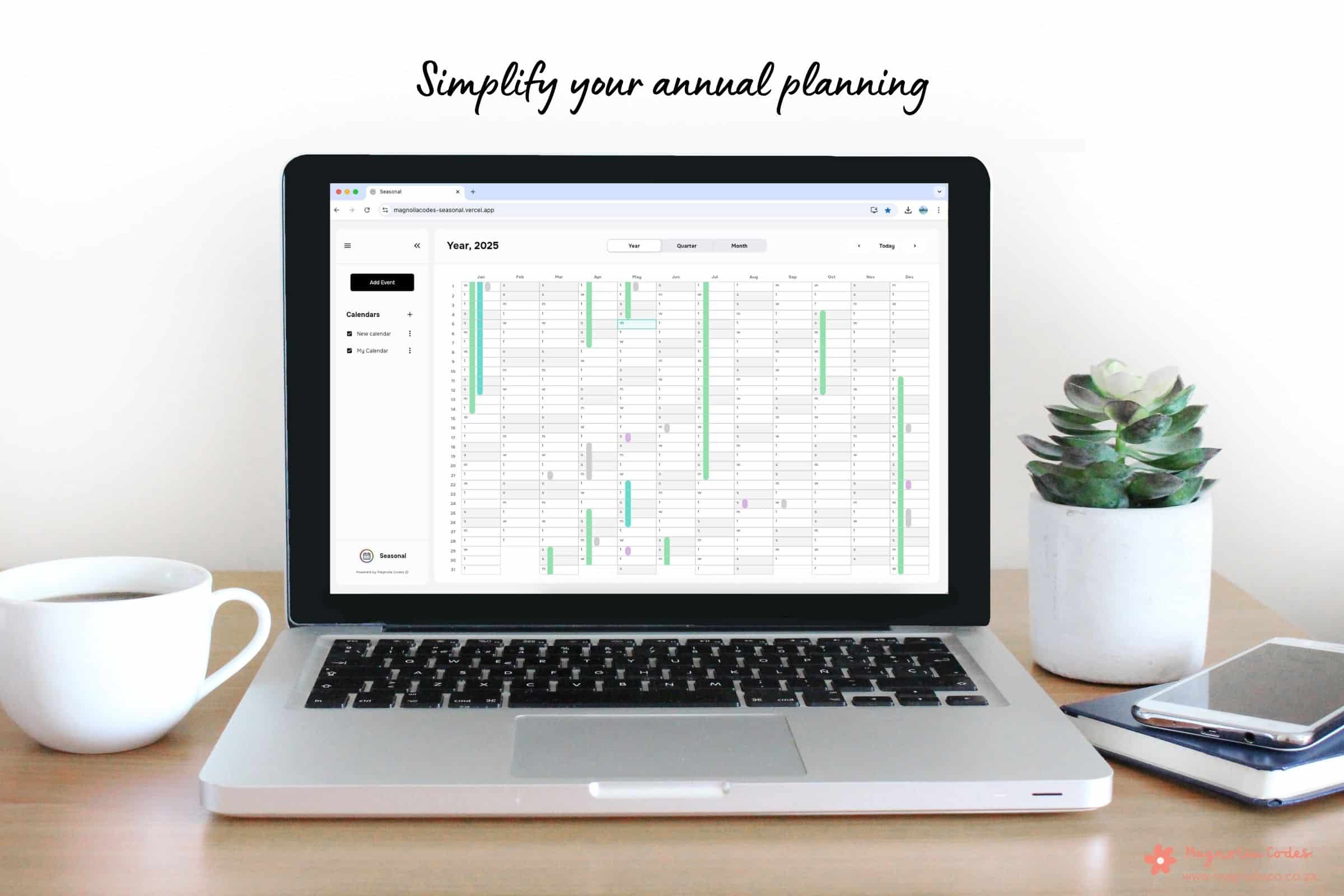
What sets this calendar apart is its clean, simplified annual view. It’s not the cluttered mess you often get from other digital calendars. This version gives you the space to plan without distractions — a place where you can see the most important things for the year without feeling overwhelmed.
When I look at it, I can see:
-
Major events
-
Personal goals
-
Family time
-
Work milestones
It’s a tool that helps me stay intentional and align everything with my bigger picture, making sure I’m working towards the life I want, not just running through the motions.
Version 1 Features
For the first release, I focused on keeping things simple, clean, and functional. Here’s what version 1 includes:
-
Annual, monthly, and weekly layouts
-
Color-coded events
-
Secure login system
There’s no sharing yet, and you can’t import events from other calendars — but those features are on my to-do list for future releases.

What’s Coming Next
Looking ahead, I’ve got big plans for this app. I want to build in:
-
Google/Apple calendar imports, so you can bring in your existing events
-
Sharing capabilities to collaborate with others
-
Time-blocking features to help with goal alignment
-
Better tagging and filtering for easier management of events
The goal is to make this app more than just a annual calendar — but a powerful planning tool that helps you organise and prioritize your life.
Final Thoughts
I’m so proud of what this project has taught me. It’s more than just a tool — it’s become a symbol of intentional living. It’s about focusing on the things that truly matter, and having a clear view of what’s coming next.
Building and launching this app was a huge step for me. It wasn’t perfect, but it was done — and that’s what matters.
I’m excited about the future features, but for now, I’m taking a moment to celebrate getting this first version out into the world. And I’m already thinking about what’s next. Stay tuned.
TRY IT OUT…

This is the very first version of my annual calendar app — simple, focused, and built with love. If you’d like to give it a try, you can access the BETA Version below.
Found a bug? Have an idea for a new feature? I’d love to hear from you! Please share your feedback here:
Feedback From
Thanks for testing it out — your input helps shape what comes next!