

When I started building my Annual Calendar App, I knew I needed a backend that matched the way I think — structured, relational, and secure. After trying Firebase in a previous project and feeling completely out of place, I decided to go with Supabase, and I haven’t looked back since.
Coming from a traditional IT and data background, and having managed a data analytics team, data design has always been step one for me. I naturally think in tables, relationships, joins, and constraints. Whenever I start a project, I begin by sketching out the schema — how the entities relate, what the rules are, and where the integrity needs to be preserved.
With Firebase, I constantly found myself asking:
“How does the data join?”
“What happens if I delete a parent?”
“How do I enforce integrity without foreign keys?”
Frankly, it made me uncomfortable — and a little scared.
What I Needed
For my Annual Calendar App, a personal project aimed at helping users plan and review their year visually, I had a few clear requirements:
-
A relational database with strong schema support
-
Open source, with a generous free tier
-
Built-in user authentication
-
Support for client-side development with Flutter
-
Optional serverless functions if I needed to scale logic later
Supabase checked all those boxes — and did it beautifully.
Why Supabase Clicked
Supabase gave me exactly what I needed, without fighting against how I think:
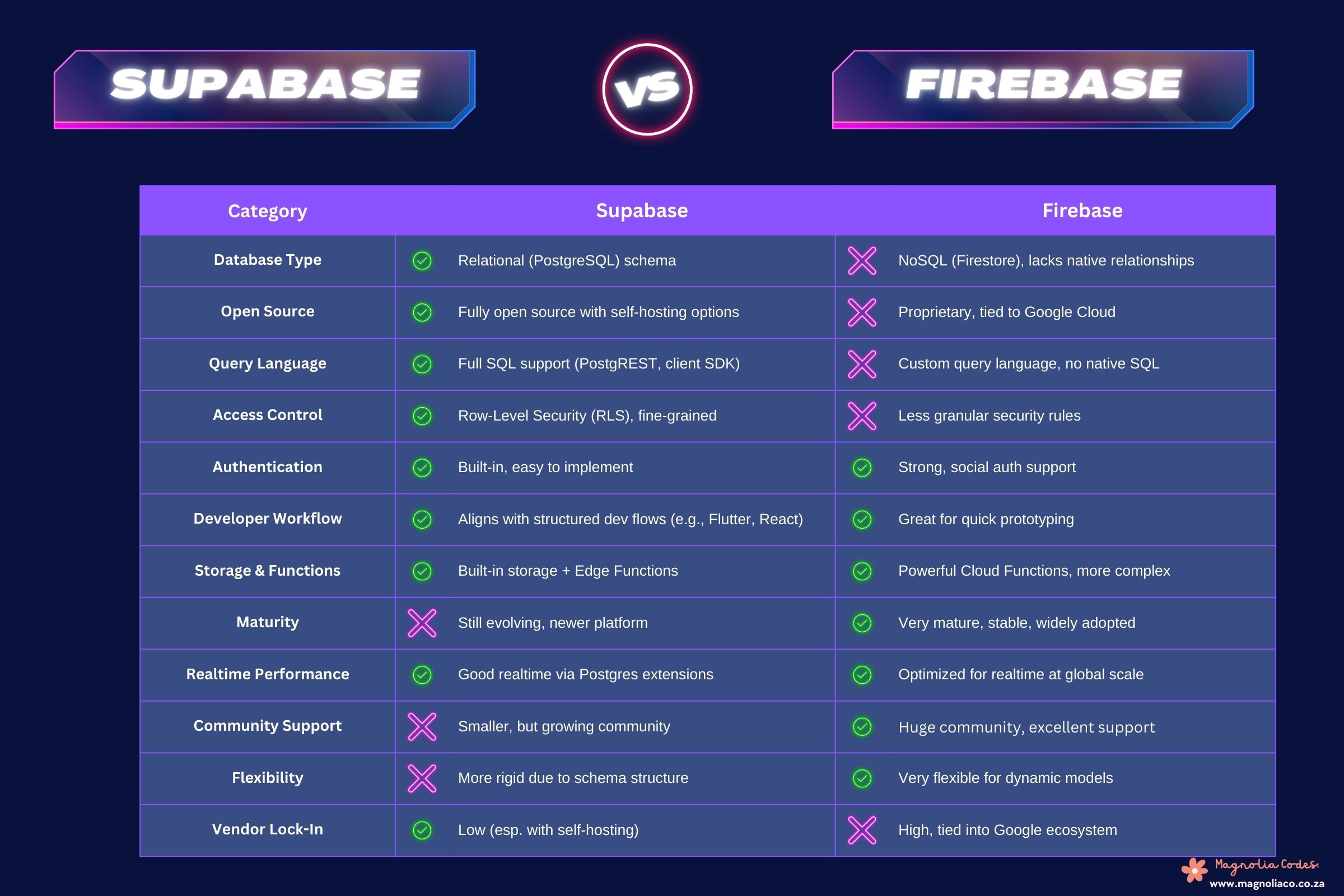
- PostgreSQL at its core — so I could design my schema with familiar concepts like one-to-many relationships between users, calendars, events, and categories.
- Built-in auth that just worked, no hacking required.
- Row-Level Security (RLS) to keep each user’s data safe — an extra layer of control that made me feel confident in what I was building.
- Super easy setup with clear documentation, and loads of community support, especially in the Flutter + Supabase space.
- Client-side logic covered 95% of my needs, and I knew serverless Edge Functions were there if I wanted to grow.
I also appreciated how visible and intentional my data design felt. It wasn’t nested JSON blobs or sprawling documents. It was structured, queryable, and solid — just like a proper database should be.
Where Firebase Fell Short
If someone asked why I didn’t stick with Firebase, I’d say: “Because I value data integrity and I couldn’t get my head around a backend where foreign keys don’t exist.”
Firebase is powerful, especially for realtime apps, but I constantly felt like I was patching together structure where it didn’t exist by design.
Would I Recommend Supabase?
Absolutely — especially if:
- You’re building something with structured data
- You prefer SQL over NoSQL
- You want auth, storage, and security built-in
- You’re using Flutter, and want great documentation and community support
That said, if you’re building a realtime chat app or need a highly unstructured, rapidly evolving data model, Firebase might still be a better fit.
Key Takeaway
Implementing Supabase in my project gave me peace of mind. It felt natural. It matched the way I think, and let me focus on delivering value — not wrestling with the backend.
If you value structure, security, and developer joy, I highly recommend implementing Supabase in your next project.